Stock Watchlist: save the companies you read about
You are halfway through an article and a company catches your eye. Click the toolbar icon, see which listed companies the page mentions, and keep the ones you want to look into later – in a watchlist that stays in your browser. Free for Chrome and Firefox.
- Free
- No account
- Firefox desktop 142+
- Opens the official store listing in a new tab
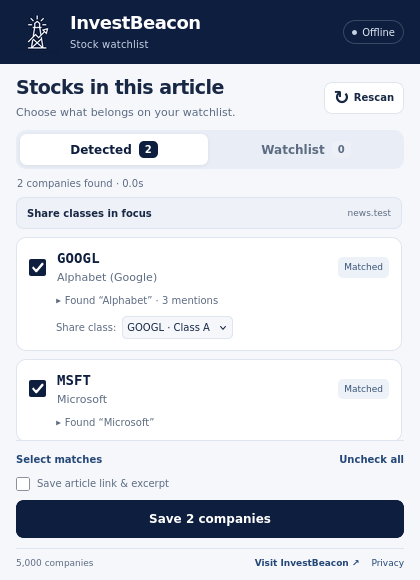
From article to watchlist
Three clicks, no sign-up. The extension only looks at a page when you ask it to.
Open an article and click the icon
Reading a news story or research page? Click the InvestBeacon icon in your browser toolbar. Opening the popup is what starts the scan of that page.
Look over what it found
The popup lists the companies it recognised. Clear matches are already ticked; uncertain ones are left unticked so you can decide.
Save the ones you want
Keep your picks and save them to your watchlist. If you like, also keep the article link and a short excerpt – that option starts unticked.
What it does
5,000-company directory. Recognises company names and tickers using a bundled directory of large listed companies, based on a snapshot dated 24 October 2026.
Matching on your device. The page is scanned locally in the popup. Scanned text and watchlists are not sent to InvestBeacon or a remote recognition service.
Search the directory. Look up any company in the bundled directory and add it without scanning a page.
Share-class choice. Where a company has supported listings or share classes, choose which one to keep.
JSON import and export. Export your watchlist to a JSON file as a backup and import it again later. Exported files are not encrypted.
No account needed. No sign-up, analytics, live prices or market-data service. Watchlists stay in the extension's local browser storage.
Limitations
- Matches can be missed, incorrect or outdated. The directory is a dated snapshot, not a live ranking, and does not cover every listed company.
- Only the loaded text of the top-level page is scanned, with a limit on very long pages. PDFs, text in images, inaccessible frames and protected browser or store pages cannot be scanned.
- A watchlist holds up to 1,000 companies. There is no cloud sync between devices.
- No live prices, no brokerage connection and no trading. A detected or saved company is not an investment recommendation.
- The Firefox edition requires Firefox desktop 142 or later and does not run in private windows.
How your data is handled
The extension's privacy policy explains page scanning, local storage, optional article links and JSON import/export in detail. Your browser and the extension stores have their own terms and privacy policies.
Questions about the extension
Does the extension scan every page I visit?
Where is my watchlist stored?
Does it show stock prices or connect to my broker?
Why was a company not detected?
Is a confidence label a rating of the company?
How do I get help?
Install the Stock Watchlist
Pick your browser to open the official listing.